

We understand how frustrating it is when your newly published pages simply refuse to show up in search results.
This is a common hurdle for many Malaysian e-commerce stores and local brick-and-mortar businesses. Hitting the publish button no longer guarantees that a search engine will automatically catalogue your content. Our recent technical audits reveal that up to 30% of valid pages on expanding sites frequently remain completely invisible.
The reality in 2026 is that a flood of automated content has forced search algorithms to become extremely selective. Sites with weak technical foundations might have hundreds of URLs discovered, but only a tiny fraction actually make it through.
We find that you can usually identify these specific roadblocks in just a few hours. The most effective place to begin your troubleshooting is always Google Search Console. This free platform gives you a direct look into exactly how crawlers interact with your website.
Our team will now break down the main reasons this is happening and walk through the exact workarounds you can use today.
Why the “google not indexing my website” problem is more common than you think
Adam SEO was built back in 2011 on a simple premise: search rankings are meaningless without tangible business results. That principle rings especially true today when an estimated 10% to 30% of pages on growing sites fail to appear in search. We frequently see sites with weak architectural foundations get thousands of pages discovered without them ever reaching the active index.
The “google not indexing my website” complaint has become a daily struggle for marketers because algorithms are aggressively filtering out unoriginal content. The 2026 search landscape prioritises platforms that demonstrate high technical health and unique value. Our experience shows that quality signals, crawl efficiency, and topical authority actually dictate whether a URL gets stored and ranked.
Discovery simply means the bot found the link on your site or a third-party domain. A strong technical baseline helps Google process your domain quickly. We emphasise that the indexing process now demands active management rather than passive waiting.
The five most common indexing blockers
Identifying these exact culprits saves you from guessing or making unnecessary changes to your content. The Search Console Page Indexing report will typically highlight one of the following five issues. Our technical audits consistently trace visibility drops back to these specific configuration errors.
Here is a breakdown of the most frequent roadblocks:
- Robots.txt and noindex mistakes: A disallow rule in your robots.txt file or a rogue noindex meta tag is the simplest cause. We sometimes catch staging code pushed to live servers, which accidentally blocks crucial pages from bots.
- Sitemap problems: Incomplete XML files or sitemaps containing broken URLs will immediately confuse crawlers. You must validate your sitemap content to ensure it only includes the 200-status canonical pages you actually want indexed. Our team often finds that fixing these basic file errors instantly resolves the seo indexation problem for many clients.
- Duplicate content: Pages that match internal content or copy external supplier descriptions will face severe deprioritisation. The “Crawled - currently not indexed” status specifically indicates that Google viewed your page but deemed it too thin to store. We verify that adding unique insights and applying proper canonical tags resolves this duplicate content issue.
- Quality signals: Low-authority domains with isolated, unlinked posts get indexed much more selectively. Google’s crawl prioritisation heavily rewards sites with strong topical authority and clear quality signals. Our link audits ensure no important product page is left orphaned.
- Crawl budget waste: The “Discovered - currently not indexed” error often means your site has too many parameter URLs burning through its allocated allowance. E-commerce faceted navigation, like infinite scroll patterns or multi-currency filters on WooCommerce, leaves less budget for genuinely important inventory.
A practical diagnosis sequence
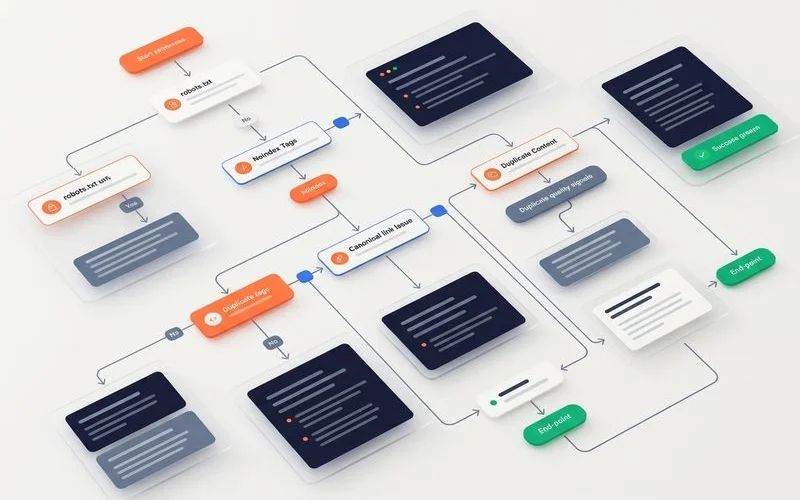
We always advise clients to diagnose google indexing issues in the exact order that Googlebot experiences the site. This systematic method prevents you from rewriting content when the actual culprit is a simple server block. The URL Inspection tool in Search Console provides a live test feature to verify these specific stages.
Our recommended workflow is simple: start at robots.txt and server crawl access. Then, check for rogue noindex meta tags across your headers. Next, verify your canonical tag configuration to ensure it points to the correct definitive page.
We then evaluate the page speed and content quality signals if the technical foundation is solid. For example, checking your Crawl Stats report for 5xx server errors ensures your hosting provider isn’t dropping the connection. A timeout during the fetching phase will halt the process immediately, regardless of how good your article is.
Our findings show that most indexing problems we diagnose for Malaysian businesses turn out to be minor configuration errors. These backend mistakes can usually be identified and fixed quickly through a proper technical SEO audit and targeted follow-up implementation. Proper execution ensures your digital storefront remains visible to the customers actively searching for your products.
When professional help is worth it
We understand that some technical troubleshooting falls outside the comfort zone of a busy business owner. Certain scenarios require immediate escalation to protect your existing search traffic and revenue. A minor drop in visibility is normal, but a sudden flatline indicates a severe structural failure.
Our diagnostic criteria help determine if you can fix the issue yourself or if you need to call in the experts. If you submit a fix in Search Console and the validation fails after the typical two-week waiting period, outside assistance is highly advised. The matrix below outlines when to handle the investigation internally versus when to escalate.
| Situation | Self-diagnosis vs professional | Key Indicator |
|---|---|---|
| One or two pages not indexed | Use Search Console URL Inspection | Isolated “Crawled” status |
| Whole template not indexed | Professional audit recommended | Parameter URL explosion |
| Sudden indexation drop | Professional diagnosis recommended | Spike in 5xx server errors |
| Migration-related issues | Professional support strongly recommended | Dropped redirect chains |
| Multi-language or multi-region site | Professional audit usually required | Hreflang tag conflicts |
We calculate that the cost of a fast professional diagnosis is usually far less than the revenue lost while waiting weeks for important pages to reappear. Enterprise sites with over 10,000 pages face complex crawl budget deficits that require advanced log file analysis. A specialised team can map these log files to pinpoint exactly where the Googlebot is wasting its time.
Where to go next
Our experts encourage you to review your wider site architecture once the immediate pages not indexed crisis is resolved. A comprehensive foundation ensures your business stays resilient against future algorithm updates. For a deeper understanding of the broader framework, see our guide on what is a technical SEO audit.
We also suggest looking at server responsiveness to ensure crawl bots can access your content efficiently. For performance issues that affect both ranking and crawl capacity, read our breakdown of Core Web Vitals and page speed for SEO. Solving the “google not indexing my website” puzzle is your first step toward true organic growth.
Our team is ready to help you uncover the exact technical barriers holding your traffic back. Do not let structural errors hide your best products from potential customers. To diagnose your specific problem and get a clear action plan, request a discovery review today.